BJJ Gym Billing: Get Paid Without Chasing Students (2026)
Last updated: November 17, 2026
End of the month. You know who has not paid. You still open the chat and type the same message again. Some answer. Some ignore. A few train all week while you pretend not to notice.
The hard part is not setting up billing. It is becoming the awkward owner. Wondering every month if the books will close. Watching the relationship with the student turn into a collection job.
You do not need another CRM for that. You need the money to arrive, and to know who is late, without chasing students.
How tuition chasing usually looks
- Manual messages. WhatsApp or SMS every month. You are the reminder system.
- Spreadsheet of who paid. Accurate until someone forgets to update a row. Then nobody trusts it.
- Card on a personal processor. Money arrives somewhere. Matching it to the roster is another job after class.
Attendance can be clean and you still lose the month in collections. Billing is its own job.
What gym billing should do
- Each student on file with the plan they chose
- Automatic collection to the academy's own account
- A clear list of who is current and who is late
- Block check-in for overdue students
- No software cut stacked on top of normal processing fees
- Works even when students do not install an app
For academy owners
How billing works in BJJ Notes for Gyms
BJJ Notes for Gyms lets you create plans, put students on the billing roster, and collect tuition through Stripe Connect. Money goes to your academy account. BJJ Notes takes 0% of tuition. Stripe's normal processing fee still applies.
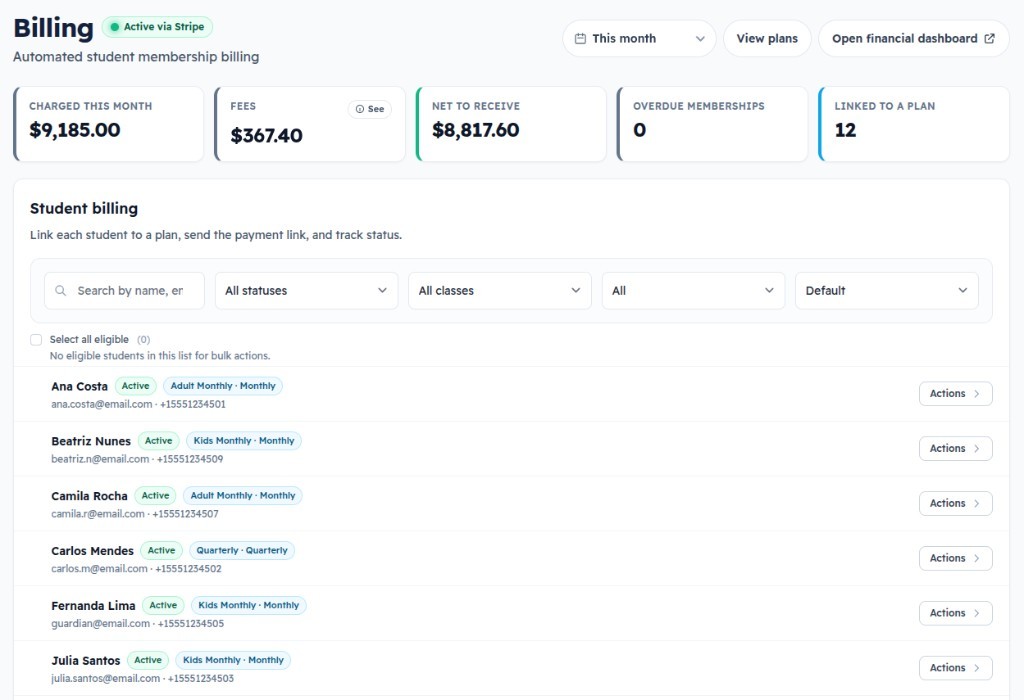
When a student is overdue, check-in can be blocked automatically. You stop having people who have not paid keep training as if nothing happened. No check-in means no attendance on the record, so it does not count toward promotion. All of this is configurable to match your academy rules.
Questions, answered
How does BJJ gym billing work in BJJ Notes?
You create plans, link students on the billing roster, and collect through Stripe Connect to your academy account. BJJ Notes takes 0% of tuition. Processing fees from Stripe still apply.
Do you take a cut of student tuition?
No. Money goes to your connected account. We do not stack a software markup on tuition.
Do students need an app to pay?
No. Billing runs from the gym portal. Students can be manual on the roster.
What if I only need attendance, not billing?
Use Coach Mode for free attendance on your phone. Move to Gyms when you need tuition and full academy ops.
Related
- BJJ Notes for Gyms
Tuition, attendance, promotions, and who is drifting.
- Best BJJ gym software
What academy software needs beyond a membership card.
- Attendance tracking for coaches
Free roll call on your phone when billing is not the job yet.